Off-peak charging: how to schedule it so you never pay the day rate
Pick one thing to own the schedule, the charger or the car, and set it there: start at the off-peak hour, say 11.30pm, and let it run to the end of the window. On a smart tariff, set a ready-by time and a target charge and the supplier picks the slots. Check the half-hourly graph after the first night.
Should the car or the charger do the scheduling?
One of them, never both, and the charger is the better choice when it has an app, because it works the same whatever car is plugged into it.
The mistake I see most is two timers. The car is set to wait for midnight, the charger is set to wait for midnight, and one of them wakes up, asks the other for power, gets told to wait, and gives up. Ohme's support page says it plainly about its own charger and a car both linked to a smart tariff: “both systems will try to manage charging at the same time, which can lead to conflicting schedules”. So pick one.
My rule: if the charger has an app, let the charger own it. A schedule on the wall box works for your car, your partner's car and the visitor's car, and it doesn't care whether the car's software update reset its settings. Set the car to charge immediately whenever it's plugged in, and let the charger hold it back. If the charger is a dumb one with no app, or you're on a three-pin cable, do it in the car instead.
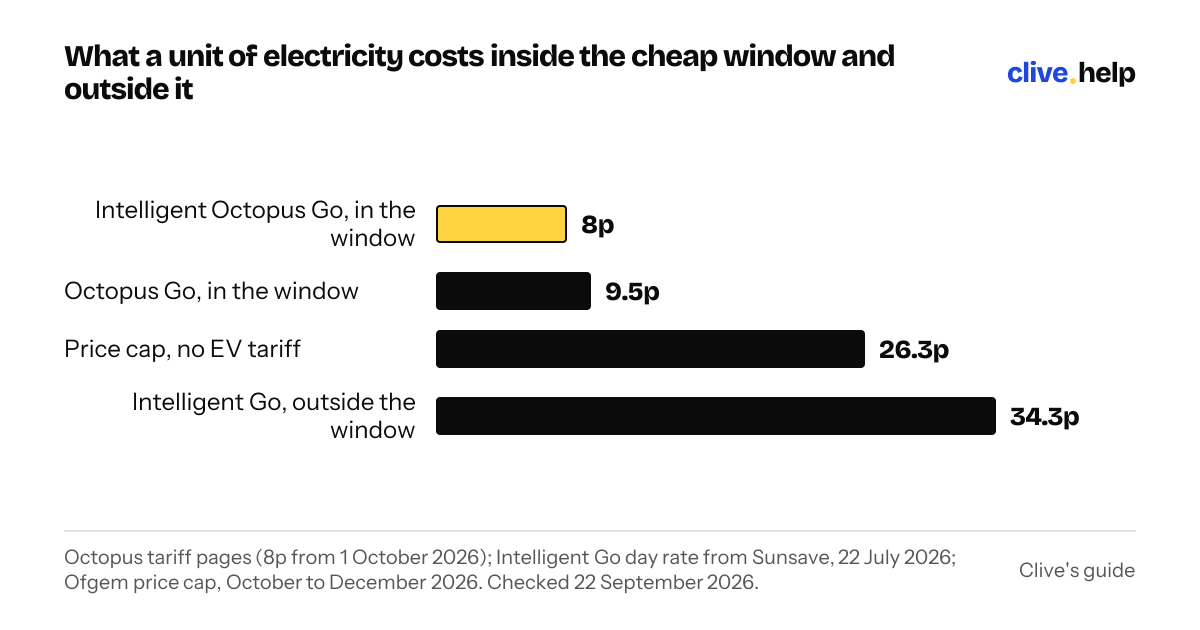
The money is real. On the October price cap a unit is 26.32p; on Intelligent Octopus Go it's 8p between 11.30pm and 5.30am. A 30kWh top-up, about 100 miles, is £7.90 by day and £2.40 in the window. Miss the window twice a week and you've given back most of what the tariff saves you.
How do I set it in the car?
In the charging menu on the screen or in the maker's app: give it the off-peak start and end times, a departure time if it asks, and choose whether it may top up outside the window.
Every EV sold in the last few years has this, and they all ask for the same three things: when the cheap window starts, when it ends, and when you want the car ready. Kia's manual says scheduled charging is set on the infotainment screen or in the Kia Connect app, and once it's on, charging “is not initiated immediately” when you plug in. That last line is the point: the car waits.
Kia and Hyundai cars give you a choice between preferring the off-peak window and charging only in it. Prefer means the car fills the window first and carries on into the day rate if it hasn't reached the target. Only means it stops at the end of the window whatever the battery says. If you never want a day-rate unit, pick only, and accept that a long day the night before might leave you short. If you'd rather be full, pick prefer.
I couldn't get at Tesla's or Volkswagen's own pages this week, so I haven't written their steps out. Both have the same settings under the charging menu on the screen and in the app; look for “scheduled charging” or “departure time”. Whatever the car, after you set it, plug in once at teatime and watch: the charge light should come on and the car should say it's waiting, not charging.
Where the schedule lives for the common cars, chargers and the main smart tariff, and what you set.
| What | Where to set it | What you set | Watch out for |
|---|---|---|---|
| Kia and Hyundai cars | Charging menu on the screen, or the Kia Connect / Bluelink app | Off-peak start and end, departure time, prefer or only off-peak | Only off-peak can leave the car short of the target |
| myenergi zappi | Main Menu, Charge Settings, Boost Timer, on the unit | Start hour, duration, days of the week | Duration 0h00 switches the slot off; boost ignores solar |
| Hypervolt | App, Add session | Days, start and stop, charging mode | Overlapping sessions can't be saved |
| Pod Point Solo | App, At Home, Manage Schedule | Times per day, green dot when active | Needs 2.4GHz Wi-Fi; offline means plug-and-charge at the day rate |
| Ohme | Ohme app | Tariff, ready-by time, charge target | Preconditioning runs in peak; Max Charge bills at peak |
| Intelligent Octopus Go | Octopus app | Ready-by time (4am to 11am), target charge | Car must stay plugged in; turn the car's own timer off |
Kia owner's manual; myenergi zappi manual revision 2.2; Hypervolt and Pod Point help pages and app guide; Ohme and Octopus Energy support pages, all read 22 September 2026. Last checked 22 September 2026.
How do I set it on the charger?
In the charger's app, or on its screen: add a session with the days, the start time and the end time, and turn the car's own timer off so they don't fight.
The four home chargers I see most all do it, and all differently.
- myenergi zappi. On the unit, Main Menu, Charge Settings, then Boost Timer. You set a start hour, minutes and a duration, and press through the days of the week you want it on; setting the duration to 0h00 turns that slot off. Boost runs at full rate regardless of any solar, so in ECO or ECO+ mode it's the timer that gets you the overnight fill.
- Hypervolt. In the app, tap Add session, pick the days, the start and stop times and the charging mode. It won't let you save two sessions that overlap.
- Pod Point Solo. In the app, At Home, then Manage Schedule; a green dot shows which days have a schedule, and it warns you in red if one day's times run into the next. The charger has to be on your home Wi-Fi for this, and Pod Point says if the connection drops it goes back to plug-and-charge, which means the day rate. Pod Point home chargers only join 2.4GHz Wi-Fi, so put the router's 2.4GHz network name in, not the 5GHz one.
- Ohme. Ohme doesn't really do fixed timers; it wants your tariff and a ready-by time, and works out the rest. See the next question.
Two habits. Set the schedule to run the whole window, 11.30pm to 5.30am on Octopus Go, midnight to 5am on British Gas, and let the car stop itself when full. And if you also have a solar-aware mode, remember it's a daytime thing: the night timer and the solar mode are separate settings, and the solar guide explains why night usually wins anyway.
How do smart tariffs schedule it for me?
You tell the app when you need the car and how full, the supplier picks the half-hours, and everything it schedules is billed at the cheap rate even outside the fixed window.
Intelligent Octopus Go is the one most people mean. Octopus's help page puts it in one line: “use the app to tell us when you need the car charged and how much charge you need”. Your house gets 8p from 11.30pm to 5.30am whatever happens. The car gets up to six hours of cheap charging in every 24, counted midday to midday, and Octopus places those hours where the grid is quietest. If it schedules the car at 2pm on a windy Tuesday, the house gets the off-peak rate for that half hour too.
The settings are a ready-by time and a target. With an Ohme charger, the ready-by time has to be between 4am and 11am and you choose whether to prioritise the saving or hitting the target. Octopus's own advice for that setup is to turn dynamic charging on, set the charge you want to add, and a ready-by time between 4am and 11am. Then leave the car plugged in. The schedule only runs if the cable is connected, and a car that's unplugged at 11pm because you wanted it tidy is a car charged at the day rate tomorrow.
Two traps. Max Charge, the button that says charge now, is billed at the peak rate for any units it adds in peak hours, which Octopus says on the same page. And preconditioning through Ohme runs in the final 5 to 60 minutes before your ready-by time, which is usually peak, so a warm cabin at 7am costs day-rate money. Octopus's Charge Cap setting is the opposite safeguard: turn it on and the car stops before it reaches the expensive rate. With a smart tariff, switch the car's own timer off entirely; the supplier is the schedule now, and a second one just gets in its way.
How do I check it worked?
Look at the half-hourly usage graph in the supplier's app the next day, then at the first bill, and make sure the big bars sit inside the cheap window.
Don't trust the setting; trust the meter. Octopus's app has a Usage tab with a half-hourly graph, and it only shows that detail if your smart meter is sending half-hourly readings, which an EV tariff needs anyway. The graph updates once a day, so look the morning after. What you want is a wall of tall bars starting at 11.30pm and nothing much between 6am and 11pm except the kettle.
If there's a tall bar at 7pm, the car charged the moment you plugged in and the timer didn't take. Nine times out of ten it's two timers, or the charger dropped off the Wi-Fi, or the car's clock is on the wrong side of the clocks going back. Fix it that day: a week of that at 26.32p is the tariff's saving gone.
Then the bill. An EV tariff bill splits the units into the rates, and the off-peak line should be most of the electricity a car household uses. If it isn't, come back to this page. The tariff comparison has what a good month looks like in pounds, and the smart meter guide covers the half-hourly readings the graph depends on.
Sources
- Octopus Energy: Intelligent Octopus Go rates, checked 21 September 2026
- Ofgem: energy price cap unit rates and standing charges, 1 October to 31 December 2026, checked 21 September 2026
- Octopus Energy help: how does Intelligent Octopus Go work?, checked 22 September 2026
- Octopus Energy: Intelligent Octopus Go smart charging and Charge Cap explained, checked 22 September 2026
- Octopus Energy: Intelligent Octopus Go with Ohme, your questions answered, checked 22 September 2026
- Ohme support: how does Intelligent Octopus Go work with Ohme?, checked 22 September 2026
- myenergi: zappi user manual, revision 2.2, July 2023 (Boost Timer, section 11), checked 22 September 2026
- Hypervolt help centre: Multi Mode Scheduling, checked 22 September 2026
- Pod Point: charge scheduling is now available in the Pod Point app, 4 August 2021, checked 22 September 2026
- Pod Point app user guide (PP-D-MK0068-1): charge scheduling, checked 22 September 2026
- Kia owner's manual: scheduled charging, checked 22 September 2026
- Octopus Energy: the best ways to track your energy consumption and spending, checked 22 September 2026
Read next
- The best EV tariffs in the UK, and which to pickEDF, Octopus and E.ON have the cheapest EV tariffs at 6.99p to 8.5p a kWh off-peak. The rates, the hours, the day-rate catch, and which to pick for you.
- Octopus Intelligent Go vs Agile vs Go: which wins for an EV?Intelligent Go at 8p overnight suits most EV drivers, Go is the fallback without a compatible car, and Agile only wins if you can chase half-hourly prices.
- Do you need a smart meter for an EV tariff?Every EV tariff needs a smart meter sending half-hourly readings. Which meters count, how to get one free, how long it takes, and what to do meanwhile.